
 Mostly EU data storage, free trial
- From $35
- 20 to 120 headshots
- Ready in 1 to 2 hours
- Up to 10 free headshots
Guide · 2026
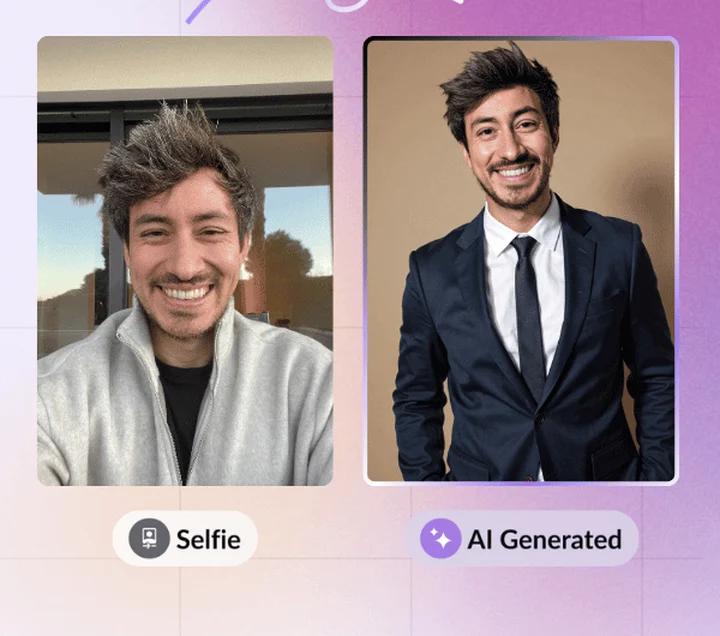
AI headshot services turn a handful of selfies into professional portraits. When does a LinkedIn AI headshot make sense, what does LinkedIn allow, and how do the offers compare?
2026 comparison
Two services that turn a few selfies into professional AI headshots. Prices checked on 11/12/2026, in alphabetical order.
Mostly EU data storage, free trial
 Redo or refund guarantee
An AI headshot is a portrait generated online from your own selfies. The right choice depends on your budget, your deadline and the image you want to project.
| Option | Cost | Time | Best if… |
|---|---|---|---|
| Phone photo | Free | 10 minutes | you have a window, a plain wall and a timer (or someone to take the shot) |
| AI headshot service | $29 to $79 at the two services compared (prices checked on November 12, 2026) | 15 min to 2 h | you want several styles quickly, without booking a shoot |
| Photographer | Quote-based, the highest of the three | Appointment, then retouching | you need a guaranteed result for a company site, press or a whole team |
A well-shot phone photo is enough in most cases. An AI headshot becomes useful when your current photos are blurry, dark or badly framed and you have neither the time nor the chance to retake them. A photographer remains the safe bet for a demanding personal brand.
LinkedIn's Professional Community Policies ask you to use your true identity and forbid using, as your profile photo, an image that isn't your likeness. They don't specifically mention AI-generated portraits.
In practice, a LinkedIn profile picture AI service only makes sense if the result truly looks like you: same face, same haircut, same apparent age. People who meet you on a video call or in person should recognize you.
Before paying, try these three settings: they fix most bad profile photos.
You're handing over photos of your face: before ordering, check where they're stored, how long they're kept and whether they're used to train other models.
Banner Preview never sends your photos to these services: if you order, you upload them yourself, directly on their site.
Criteria used: price, number of headshots, styles, advertised delivery time, photo storage and retention, guarantee, from each service's public pages. Listed alphabetically: this isn't a ranking, and it doesn't cover the whole market.
| Criterion | BetterPic | HeadshotPro |
|---|---|---|
| Price (individual plans) | $35, $39 or $79 | $29, $39 or $59 |
| Headshots delivered | 20, 60 or 120 | 30, 50 or 70 |
| Free tier | Up to 10 headshots, no guaranteed delivery time | None on the pricing page |
| Styles | 1, 3 or 6 (background, outfit, color) | Style library, no custom outfits or backgrounds |
| Advertised delivery | 1 to 2 hours | 15 min to 2 hours |
| Photo storage | Mainly EU (Frankfurt), partly US | Western Europe, US application servers |
| Retention | Selfies up to 1 year, deletion on request | Automatic deletion after 30 days |
| Guarantee | Not stated on the pricing page | Redo or refund if the result doesn't look like you |
Prices checked on November 12, 2026 on the public pricing pages, in US dollars, excluding promotions. Prices and terms can change: check them on the service's site before buying.
None of these services currently pays us.
A portrait that looks great full size can lose impact in LinkedIn's small circle. Before switching photos, test it in real conditions.
Our free profile picture viewer shows your photo exactly as LinkedIn displays it on desktop and mobile, with no sign-up, and exports a correctly cropped file. Make sure your face stays sharp, centered and readable at small sizes.
FAQ
LinkedIn's rules require a profile photo that is your likeness and forbid fake profiles. They don't explicitly ban AI-generated portraits: a headshot created from your selfies simply has to look like you.
At BetterPic and HeadshotPro, individual plans range from $29 to $79 for 20 to 120 headshots (prices checked on November 12, 2026). BetterPic also has a free tier limited to 10 headshots.
It depends on the service. BetterPic recommends around 8 varied photos, HeadshotPro asks for a few selfies. The sharper, better lit and more varied your photos, the more faithful the result.
Each service has its own policy: BetterPic keeps selfies for up to 1 year (EU primary storage), HeadshotPro deletes everything after 30 days. Read it before ordering.
Some AI portraits give themselves away with overly smooth skin or inconsistent details. Pick the most natural result: the goal is for people to recognize you in an interview.
Yes: face a window, hold your phone at eye level, use a plain background and head-and-shoulders framing. Then check the result in our free profile picture viewer.